Monday, March 18, 2013

How Can Your Business Benefit From Pinterest’s New Analytics Tool?

Last week Pinterest finally launched what many business users on the image-sharing network have been crying out for – its brand new web analytics.

How Can Your Business Benefit From Pinterest’s New Analytics Tool? image Pinterest logo

Why all the excitement? Well up until now, Pinterest users have found it difficult to gain meaningful insights into how their audience was engaging with their content.

Whilst you could check new followers, likes, repins and comments via the activity feed, unless you were using third-party solutions like the excellent Curalate, much of the tracking available within Pinterest involved guesswork and assumptions.

Although they’re nowhere near the sophistication of Facebook Insights, Pinterest’s analytics are definitely a step in the right direction for bloggers, businesses and organizations wanting to find out what people are pinning from their websites.

Let’s take a look at how you can make this new tool work for you. But before you rush in, there are a couple of steps you need to take to gain access to the analytics area.

Get Your Page Ready For Pinterest Analytics

So let’s get started.

#1 Verify Your Page

The first step in this 2-part process is to verify your Pinterest account.
To find out if your page is already verified, take a look at the About section.
Is there a bold red check mark next to your website? If there is then your page is verified and you can move on to step #2.
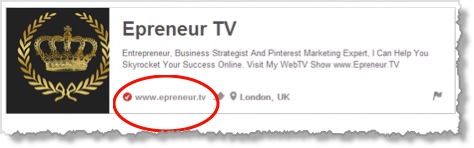
How Can Your Business Benefit From Pinterest’s New Analytics Tool? image pinterest 1
But if your URL is still hidden behind the globe icon or if you’ve resisted verifying your Pinterest page, then now is a good time to take the plunge.

Besides making the URL more visible to potential followers, verification is an essential first step in order to access Pinterest’s new analytics. So be sure to do this.

If you run into any difficulties, for example if your site is on Blogger, WordPress.com or on a sub-domain, then you can email Pinterest for help.

#2 Activate Pinterest’s New Look

New look, what new look?

In January this year and without much fanfare, Pinterest began testing out a new look. Its aim is to increase user engagement and discovery by making the navigation simpler and faster. The pins are bigger and there’s also a visually more attractive background.

But since these changes are quite subtle, you may not even notice the difference.

The key point is that you must activate the new look if you want to access Pinterest’s analytics.

To do this, click on the profile menu located to the far right of your page. Scroll down to Switch To The New Look.

How Can Your Business Benefit From Pinterest’s New Analytics Tool? image Pinterest 2

You will then be taken to a second screen where you just need hit Okay.

How Can Your Business Benefit From Pinterest’s New Analytics Tool? image Pinterest 3 1

If for some reason you don’t see this option then follow Pinterest’s instructions on what to do next.

Don’t like the new look? While you do need it to view your analytics you’re not stuck with it. Pinterest is currently allowing users to switch back to the old look until it rolls it out permanently.
On the next screen, you’ll be able to experience the new look in action. Your pins will suddenly appear bigger and clearer. The profile menu is also different with a new Analytics tab and the option to Switch To The Old Look.

How Can Your Business Benefit From Pinterest’s New Analytics Tool? image Pinterest 4

Click on the Analytics option, and you will be taken through to the site metrics page.

How Can Your Business Benefit From Pinterest’s New Analytics Tool? image Pinterest 5
Image Source: Pinterest

How To Use The Analytics Dashboard

The site metrics page is made up of 4 graphs that measure pins, repins, impressions and clicks.

Pinterest has created this excellent, step-by-step video that shows you how to make the most of the web analytics page.

I recommend watching it to quickly familiarize yourself with the dashboard.

Click here to view the Pinterest analytics video.

How Can Your Business Benefit From Pinterest’s New Analytics Tool? image Pinterest analytics video

It’s worth noting that the analytics currently only provide information about your own content and only for sites that are verified.

Therefore, if you are only repinning other people’s content you are not maximizing the full potential of Pinterest and there will be very little data to see.

Equally, the data only goes back as far as November 2012 when site verification was introduced or from the date you verify your site.

It’s therefore essential that you get your site verified sooner rather than later.

Key Takeaways

Although the information is limited, the insights can still be very useful especially if you’ve ever asked yourself the following questions:

#1 Who is pinning my content?

Do you want to know who your content is resonating with or how many people are actually pinning from your website? Pinterest’s analytics can help you see at a glance;
  • how many unique users have pinned your content across various date ranges
  • the number of repins, impressions (how many people have seen your pins) and clicks (the number of actual visits) to your site.

#2 Which content is being pinned right now?

The dashboard’s “most recent” tab lets you track the content that is being pinned from your website in real-time. You can go as broad as 30 days or zoom in and focus on a single day.

By changing the date ranges you can monitor any peaks and troughs in the pinning activity, and analyze which days, weeks or periods generated the best reaction from your audience. This can be extremely useful for businesses that experience seasonal fluctuations or bloggers who want to track when their posts are being picked up and shared on Pinterest.

#3 What’s my most popular content?

Do you want to discover which of your pins has gone viral? Have you noticed a sudden spike in repins but don’t know why?

By clicking on the “most repinned” tab you can instantly see which content in a given timeframe is resonating most with your audience, and create “more of the same” types of pins for your boards.

Businesses and brands are better placed to curate their content more effectively and determine the best approach to take when engaging consumers.

Another useful feature is the ability to export the data in a CSV file and download it to your computer.

This enables pinners to use it for further analysis, integrate it into other tools and share it with team members and stakeholders.

The downside is that only the last 100 pins and repins are picked up.

What’s Missing From Pinterest’s Web Analytics?

Pinterest has indicated that it will be introducing more business-oriented tools so their analytics are bound to change in the near future, if the speed of recent rollouts is anything to go by. It’s clear that monetization is on the horizon.

On a positive note, the new web analytics are free and can remove the guesswork from your Pinterest marketing. They can reveal through cold hard data what is working well, what isn’t and what you need to focus on in your marketing efforts.

That said, I do think it is a shame that more granular “Facebook-style” information couldn’t have been provided in this initial offering.

There is currently nothing in the way of:
  • Socio-demographic data
  • Competitor analysis
  • Country and location information
  • Mobile phone usage
  • Individual board analysis
This is the kind of pertinent information that could really benefit users, which is why my overall impression of Pinterest’s web analytics is that they’re rather basic and pay lip service to the businesses it is anxious to woo. They’re certainly nothing that its third-party analytics providers should lose sleep over.

What do you think?

Have you tried out the new analytics? What features would you have liked to have seen included?

Pinterest image by Jurgen Appelo

Courtesy of Business2Community.com  Read more at http://www.business2community.com/pinterest/how-can-your-business-benefit-from-pinterests-new-analytics-tool-0438053#rcB1e16DYbE0SPuD.99

Friday, March 15, 2013

Pinterest Social Media Marketing: 40 Ideas to Get You Started

B2B Social Media Marketing with Pinterest


Are you interested in using Pinterest as a part of your social media marketing strategy? Fifteen percent of Internet users are on Pinterest, making it almost as popular as Twitter, with 16% of internet users. The visually driven social network is known for driving referral traffic. As of September 2012, it was the fourth largest traffic driver worldwide. Before you start pinning, we recommend evaluating what your Pinterest strategy goals are. Once you know where you’re going, it’s time to start pinning. This is not the time to reach a dead-end. You’ve decided your goals and you’re ready for action. Here are some ideas to fuel your Pinterest blast off. Ready, set, pin!
  Your People
1. Your employees
2. Your clients
3. Your clients’ brands
4. Your clients’ products or service
5. Videos introducing your employees

What You Do
6. Your products
7. Your products in action
8. Your work
9. Your work process (think stages or before and afters)
10. Videos of your product or service in action
11. A photo from a positive review of your product or service
12. Graphics from your latest blog post
13. News articles featuring your product or service
14. How-to videos for your product
15. Interesting graphs from your sales presentations or marketing materials
16. Helpful diagrams and images from your sales presentations or marketing materials
17. Anything valuable in image form from sales presentations or marketing material

Your Industry
18. Industry events
19. A visualization of the current state of the industry
20. Interesting statistics relevant to your industry (in a graphic format)
21. A blog post from an expert in your industry
22. Videos explaining industry trends
23. Videos of the latest industry news
24. Videos of the latest industry events

Company Culture
25. Your workplace
26. The office summer party
27. The office Christmas party
28. Office birthday celebrations
29. Any office celebration or amusing happening
30. The office pet (think Ziggy)
31. What inspires you in the office (art or other pieces of motivation)
32. A video tour of your office

Resources
33. A helpful checklist
34. Helpful infographics
35. Books you are currently reading
36. Books you plan on reading
37. Tools you use that are helpful in doing your job
38. Others' work you admire
39. Powerful quotes from thought leaders
40. A podcast from an industry expert


What do you think are the most powerful images for B2B marketers to share on Pinterest?  

 Courtesy of Social Media Today - http://socialmediatoday.com/parkerwhite/1304676/b2b-pinterest-social-media-marketing-40-ideas-get-you-started

Your #FacebookTimeline is about to change


Facebook isn’t one to stop iterating, and the social networking giant is showing no signs of slowing down. Last week, it was a sneak peak of a brand-new news feed design, among other things. Today, it’s a heads-up for upcoming modifications to your Facebook Timeline.

To address a popular request for a more organized and easily readable timeline, Facebook announced that beginning today, users can enjoy a one-column timeline that isolates posts on the right side, while recent activity as well as photos and music are kept on the left.
books_callout_cropped

Your Facebook About page will also undergo reorganization to better highlight your movie, music, TV, and book preferences. Each category will have its own allotted space on the page, right beside your photos and friends. The Movies section can feature films you like and can be marked as Watched or Want to Watch, and you can use apps like Netflix to let your friends know what’s playing. Similarly, the Books section can contain books you pick from Goodreads and has Read and Want to Read tabs that will help you keep track of your book queue.  Every book a Facebook friend adds into their Books section can also be added to yours with a click of the add button.

Other Facebook apps you use will also have a spot on your timeline, should you choose to feature it prominently. You always have an option of removing an app from your About page through the Activity Log.
These changes will be rolling out to users all this week, and until everybody has the new News Feed, we can certainly expect more upgrades and changes to improve and streamline our Facebook experience.

Read more: http://www.digitaltrends.com/social-media/more-facebook-improvements-coming-your-way-this-time-in-the-form-of-a-one-column-timeline/#ixzz2NcSitMIg

Thursday, March 14, 2013

The Influence of St. Patrick's Day Passion


St. Patrick's Day social media

A lot of excitement can be created around St. Patrick’s Day if the effort is put in. Provide entertaining content that triggers readers to feel emotional engagement between themselves, your business, and the holiday. Play into the hype of the holiday - embrace the parades, leprechauns, pinching, four-leaf clovers, green beer, and so forth.

It’s important not to stray too far from your industry while employing these ideas.

Many marketers believe that evoking emotion through content marketing is essential to make posts go viral.

In a study regarding the shareability of articles at the New York Times, it was discovered that:

  • Awe was the second most viral type of content to be shared
  • Conversational posts receive twice as many comments on average
  • Posts filled with emotion are typically shared more

According to a study conducted by the University of Indiana, there are 6 primary emotions that humans have that you can tap into with your content.

  1. Surprise
  2. Joy
  3. Sadness
  4. Fear
  5. Anger
  6. Disgust
Especially for St. Patrick's Day, it is easier to stick to the second point - Joy. Anything celebratory  or regarding luck is the most simple to play off of. If you’re feeling creative, try a stab at one of the other six points.
Below, the pin is evoking joy. People find joy in gift ideas for their loved ones.

customer engagement 
Alright, you’re still blank on how to relate your business to St. Patrick's Day? Have you thought about tapping into surprise in a negative way - even disgust? This move is not common, yet will provoke quite the reaction from your audience. You may even realize that more people hate St. Patrick’s Day than you thought!

You may find that some people will react negatively to this, but this is a common risk with social media.

Topics that allow you to share an alike interest or opinion with your fans and followers bring on engaging conversations. For example, maybe Joe in accounting gets pinched every year by all of his colleagues regardless of whether he’s wearing green or not. Therefore, he’s developed a strong dislike for the holiday.

“What do you dislike most about St. Patrick’s Day - the pinching or the crowded bars?” Get the conversation started on your Facebook Page.


content marketing

If that seems too extreme and you feel that it won’t go over well with your audience, there’s always a lighter way to play around with St. Patrick’s Day. Think of all the stereotypical St. Patrick’s Day gear, accessories, and behavior. Find a way to poke fun at the holiday without going overboard, such as below. It would work perfectly for a funky yoga studio.

viral content

Wednesday, March 13, 2013

Pinterest Launches New Web Analytics Tool For Businesses


Online bookmarking tool Pinterest is rolling out a new Web Analytics Tool that will allow businesses to track the number of visitors delivered to their website, see what people are pinning from their site and other useful information.

 pinterest web analytics
This is part of the rapidly growing startup's effort (Pinterest quadrupled from 9 to 40 million users in 2012) to build a platform that can eventually integrate different money-making apps and features. Pinterest officially introduced business accounts for users last November and is finally making good on its promise to marketers late last year that it would introduce data analytics tools for businesses, of verified websites, to track Pinterest referral traffic. The new tool provides businesses with visual graphs about their content interactions like how many people have pinned from their site, the number of views each pin has, and the total users that have visited a site from Pinterest. Now Google Analytics can also provide data on referral traffic from Pinterest, but lacks any real insight into actual user activity on the site.

Pinterest providing companies with data about their profiles and users is a "pretty clear step in the direction" of monetizing Pinterest, said Greg Sterling, a senior analyst with Opus Research, a San Francisco-based market research firm. "They couldn't really start charging people without some way of measuring the efficacy of the spend," he said. Pinterest is "building foundations to monetize" its service this year, Chief Executive Ben Silbermann told The Wall Street Journal last month. Pinterest doesn't currently run any paid ads, but makes money through affiliate advertising, and has plans to integrate a potential advertising system, as well as further monetize revenue from merchandise sales on affiliate sites.

pinterest analytics

Just in February, Pinterest raised $200 million in venture capital from firms that include Andreessen Horowitz and Bessemer Venture Partners. The deal put a valuation on the 3-year old company at a whopping $2.5 billion. According to comScore, Pinterest was the 38th most visited website by U.S. internet users in January, with about 30 million unique visitors. The first new tool, which Reuters is reporting will be available to business for free on Tuesday, will provide key insights int user activity like frequency of clicks on particular photos. Other features Pinterest may roll out soon, according to TechCrunch, include smart "suggestions" for users based on what they have already added to boards, along with plans to launch more international sites. "The goal is really to help websites understand what content is resonating with people on Pinterest," Cat Lee, a product manager at Pinterest told Reuters in an interview. To get started make sure you have early access to Pinterest's new look, have a verified website and then you should see the analytics option available in the top right menu! pinterest web analytics   Pinterest's traffic increased by a staggering 5,124% from 2011 to 2012! With such rapid growth businesses need more efficient and powerful tools to measure engagement on Pinterest, and that day is finally here friends! Have you got to try out the new analytic tool for Pinterest yet?

Courtesy of Social Media Today - http://ow.ly/iRMQA

Tuesday, March 12, 2013

Facebook Sponsored Posts: Do They Work?

Can Facebook's sponsored stories help your marketing efforts? Maybe, but it's complicated.

AFP/Getty Images

 
Facebook is working for advertisers, according to an Advertising Age survey.

Out of 701 marketers and media execs polled, 85 percent said that they use Facebook as a marketing tactic. Just under 30 percent had tried using sponsored stories. Of them, 15 percent were very satisfied with the results, 65 percent somewhat satisfied, 15 percent, somewhat dissatisfied, and 6 percent, very dissatisfied.
Many businesses are trying to understand if, and how, sponsored posts can work for them on Facebook. Instead of focusing on "marketers and media execs," which could mean many agencies, I put a PR query out to thousands of companies and heard from dozens. This isn't a statistical study, but it did result in anecdotal evidence that helps explain how entrepreneurs are using sponsored stories and the results they're getting: good, bad, and indifferent.

Racking Up the Likes
A number of companies said that their sponsored stories were extremely successful. The PR firm for Reverb.com, a site for buying and selling used guitars, said that the company had used the format to quickly gain more than 30,000 likes on its Facebook page with only a "very modest investment." Other companies had similar stories of heavily increasing the number of Facebook likes, post shares, or other forms of engagement.

The problem is that few of these companies had a concrete way of determining the value of these likes. How did they ultimately translate into sales, improved conversion rates, or some other metric that would indicate a tangible benefit to the business? Without such a correlation, a company is left with what is called in rhetoric "begging the question" in which you assume a premise and then use conclusions to try and prove the premise. In this case, the premise is that using Facebook can improve marketing. The conclusion is that sponsored stories improve marketing because they get more attention in Facebook.

Some, like Jayme Pretzloff, online marketing director for Wixon Jewelers in Minneapolis, see benefits outside of direct sales, "including awareness, share of voice and many other indirect benefits including SEO ranking and reputation management." All of these are good points, though again, difficult to quantify, which makes it hard to know whether the amount you spend on a Facebook sponsored story campaign is worthwhile.

How Valuable Are Likes?
Green River Fishing Adventures near Vancouver, British Columbia, Canada, has seen an "increase in Web contact forms citing social media or Facebook as the lead source," according to Matthew Clive of the company's sales department. These individuals often converted to sales. In fact, there has been an increase in prospects coming to the company initially coming from Facebook.

But other companies and marketing firms have had a different experience. As Meagan Feeser, director of PR and communications at York, Pennsylvania-based Gavin Advertising says:
We've seen a lot of success with Facebook ads and sponsored stories when the desired outcome is specifically to grow likes on a brand's Facebook page. If the desired action takes place off of Facebook... not so much.
Digital marketing agency Koozai in London compared click-through rates for Facebook ads and for sponsored stories. The former was 0.017 percent and the latter, 0.169 percent, a big relative change.
Some companies find no benefit at all. Los Angeles-based Daily Threads, which makes premium cotton clothing for kids, "tried every single ad unit Facebook offers," according to consultant Erika Penzer Kerekes:
I have tried Sponsored Stories a dozen times and they have never converted for us. I always include them, and then I always end up pausing them after a few days because they're getting zero results. I'm puzzled by this as I know lots of other businesses have used them very successfully.
Chuck Cohn, founder and CEO of Varsity Tutors, a private academic tutoring and test prep provider, found that the demographics his marketing team chose would significantly change the cost per lead and, ultimately, ROI:
We've found that when we target U.S. only or--more specifically--target people living in a city like NYC, the outcome is incredibly few Likes/Comments/Shares per dollar. The cost per interaction is extremely high, but each interaction is quite valuable. If you don't target a country, then Facebook chooses to display your ads to people in Bangladesh or similarly impoverished countries.
In short, it is impossible to know in advance if Facebook sponsored stories will work for your business or not. And now, of course, results may change with Facebook's redesigned News Feed. You will need to develop metrics to understand the value of what you get beyond simply obtaining likes for your Facebook page, and you'll need to pay close attention to the demographics of any campaign to be sure you're getting through to people who can actually matter to your business.

Courtesy of Inc. - http://ow.ly/iOdZY

Monday, March 11, 2013

#PinterestMarketing - Understanding the Business Benefits


Having recently taken on a new client who had never heard of Pinterest before, I realised it would make sense for me to write a basic introduction, looking at the basics of what it is and how businesses can benefit from using it.

An introduction to Pinterest
If you are familiar with mood boards, then Pinterest won’t be too difficult to get your head around.  It’s essentially a digital pin board, a place where you can collate and categorise anything visually appealing that you come across online.

Pinterest For Business
You can take a look at my own Pinterest here as an example – you’ll see a wide range of different board topics.  Whilst most of them are related to web design and my profession, I also have a number of other boards that are more personal. As with all social networks, one of the benefits of using Pinterest is that it gives you the ability to define not only a brand, but to expose the person or people behind that brand. This makes it much easier for people to relate to your brand and showcasing your passion, interests and areas of expertise is a great way of connecting with potential customers.

There is more to Pinterest than cupcakes, craft and cats
Whilst Pinterest is very well suited to visual imagery, it is increasingly being used as a way of collecting primarily text based content, such as recipes and blog articles.  A decent blog article will have at least one picture, so posting this picture along with the blog article title and pinning it on a relevant board, can be  great way of utilising Pinterest to promote non graphical content; in particular for service based businesses who don’t have products to promote or attractive lifestyle shots to pin.

Some Pinteresting stats
  • Pinterest is now either the 2nd or 3rd biggest social network, depending on which statistics you read, and is currently showing the fastest rate of growth
  • There is no vertical size limit on pins, providing a great deal of scope for creativity
  • Approximately 58% of Pinterest users are females
  • Product pictures pinned with a price are more effective (that is to say they will generate a better CTR) than product pins with no price shown
  • Click through and sales conversion rates are better on Pinterest than on either Twitter or Facebook
  • Pinterest users tend to have a higher than average disposable income
  • Some of the most popular Pinterest topics are interiors, DIY, cookery, fashion, hobbies and crafts
  • Shoppers referred to a website via Pinterest spend 10% more than those referred by other sources
optimized Pinterest board
Example of a fully optimised Pinterest board

What’s the point of Pinterest?
Pinterest provides the opportunity for businesses to demonstrate expertise and credibility in any given area.  For example, when an interior design brand puts together a board featuring a large number of inspirational room themes, potential customers will often be inspired by such a board and will not only trust that brand, but will also look to it for ideas – you can effectively use Pinterest to add value, which is a great way of attracting new customers and increasing your appeal to existing customers.

Pinterest will not only provide you with more backlinks to your website, a crucial SEO ranking signal, but it will also increase your visibility.  Instead of people finding your website, being visible on Pinterest gives you additional potential touch points.

Pinterest lets you source and post appealing content that others will find interesting and will want to like and share
Pinterest is an excellent way of showcasing your products and of demonstrating your passion and expertise in a particular area, and when your content engages people, they will like and share (repin) it, helping your content spread virally.  This ensures that your brand reaches additional would-be customers, who might not otherwise have been exposed to your existing or usual marketing channels.

Pinterest tips
  • Make sure you write an interesting profile, make it informative and try to give it a bit of personality
  • Research your competition before you set up your own boards, see what topics your competitors cover so you can create boards that will be popular and interesting
  • Add your main website address and be sure to follow the Pinterest verification process
  • Give each board an informative name and make sure you include a compelling, keyword focused board description
  • Optimise all the images that you upload – make sure the file names contain descriptive keywords.  Once uploaded, edit your pin to include a link back to the original source or related content on your website.
  • Keep the width of Pinterest images to around 540px and make the most of the fact there is no vertical size constraint.  Narrow, long pins are much more eye catching than short images
  • Write a number of ‘how to’ guides that deal with common problems your customers encounter, providing them with real value
  • Create a board to showcase your latest, best selling or favourite products
  • Don’t forget to include calls to action on your boards and in pin descriptions
  • Make sure you add the Pinterest share button to all of your product and content pages on your website and blog
  • Comment on, like, share and follow other relevant boards
Originally posted on Social Media Today - http://ow.ly/iLe7i